New PC Decisions

Discussions about anything Computer Hardware Related. Overclocking, underclocking and talk about the latest or even the oldest technology. PCA Reviews feedback
fogus
Posts: 149
Joined: Fri Mar 04, 2005 12:56 pm
Location: Earth (mostly)

New PC Decisions

Post by fogus »

Well, it is time for a complete rebuild. I've been running on my very first computer for about eight years, having upgraded the video card once, the motherboard once, the CPU once, the hard drive to a Kingston SSD and then to an Intel 330 SSD, and the RAM to 8G. But the processor is an old dual core 2.4GHz AMD, and the graphics card is an Nvidia 7600, and it just can't take it anymore.

I have a few goals:
  1. Completely awesome G+ video streaming.
  2. Silence... I want a queit PC so I can hear my music and make good voice recordings.
  3. Insane I/O. Maybe RAID0 with two SSDs. (Yes, I back up.)
  4. Oodles of RAM to make RAM disks and such.
  5. Power efficiency. A KWh is $0.22 here because of "delivery."
  6. Four HD monitors connected directly to the graphics card (no USB thingies degrading my video streaming).
I am therefore thinking of these components: Looking forward, as always, to your input!
~fogus
User avatar
FlyingPenguin
Flightless Bird
Posts: 33161
Joined: Wed Nov 22, 2000 11:13 am
Location: Central Florida
Contact:

Post by FlyingPenguin »

I am fairly certain that the Sapphire 6870 can't use all four video outputs at the same time. The only 6870s that can do 4 displays are ones that have two display port (or two mini display port) jacks. Looks like the XFX you linked to does.

To confirm, I found this in this thread: http://www.tomshardware.com/forum/35711 ... plays-6870
There certainly are 6870s that can drive 4 displays, I own one. That said, it has to be one with either 2 Display Ports, or 2 Mini Display Ports at the back. You can then drive either 2 monitors on DVI, and 1 on each Display Port, or 1 on DVI, 1 on HDMI, and 1 on each Display Port. Check the back of the card and see what you have. If you only have 2 DVI, 1 HDMI and 1 Display Port, which is the common configuration, you'll only be able to drive 3 displays with your card.
I would also look at a Radeon 7000 series or Geforce 600 series card first. While the 6870 is still a great card, it's also one generation behind and they have introduced some new tech in the latest gen.

I see absolutely no reason to go with RAID0 SSDs unless this was a high-end video editor ONLY being used for that (MAYBE). Fact is that the latest SATA6 drives are going to saturate the SATA bus anyway. Only way you'd see any dramatic improvement over a single drive is to use a high-end hardware add-on RAID controller instead of the onboard.

Instead of two 120Gb SSDs get ONE 240+Gb SSD. Larger capacity SSDs are generally faster.

Unless you are overclocking your CPU (which is totally NOT worth it anymore IMO) I wouldn't get the Corsair Vengeance RAM or ANY "peformance" RAM. The performance RAM generally requires a LOT of tweaking of the timing to make it work on even a non-overclocked mobo. Can't tell you how often I have had friends lament buying performance RAM. You want RAM you can just plug in and KNOW it will work WITHOUT any tweaking. I'd recommend going to Crucial.com and using their online database to get the memory they guarantee will work with it. Get their regular RAM, not the Ballistix performance RAM.

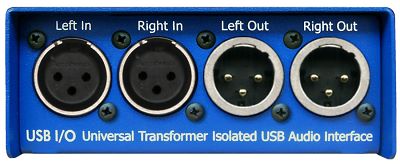
Friends I have doing studio recording tend to like this AD I/O box. It has transformer isolation unlike the cheaper units: http://www.arx.com.au/International/audibox_usb_io.htm

Image
Image

This is your basic 2 channel in and out. They also make fancier ones with more inputs and outputs.

---
“The Government of Spain will not applaud those who set the world on fire just because they show up with a bucket.” - Prime Minister of Spain, Pedro Sánchez

Image
fogus
Posts: 149
Joined: Fri Mar 04, 2005 12:56 pm
Location: Earth (mostly)

Thanks, FP

Post by fogus »

Very glad you're still on here, FP! Thanks for your reply.

You're saying something like this 7770 would be a good four monitor idea? I'd be using both display ports, converting them to DVI (I suppose), the DVI port, and the HDMI port. Unless there are monitors that take display port directly. I don't have the monitors yet.

So, a SATA 6 bus is shared among all of the drives on it. Hm. What if a single drive was maxed out in IOPS, but the bus wasn't full? Couldn't a RAID0 help then?

Thanks for the RAM suggestion. Is XMS3 Corsair's "normal" RAM? What about this Kingston RAM?

I couldn't find a link to buy that USB audio card. Would you actually order from that website itself or do you know of another that is more US-based (I'm living in the US now)?
~fogus
User avatar
Shadow250
Golden Member
Posts: 1172
Joined: Fri Jan 04, 2002 9:08 pm
Location: Walton New York 13856
Contact:

Post by Shadow250 »

about ssds ive had a chance to benchmark a 120g vertex and a 240g vertex both run 549 mb/sec using atto
both were done with identical hardware.
maybe you will find my results useful
Image

<a href="http://www.heatware.com/eval.php?id=9490"><font color=red>My Heatware<font/></a> <font color=white><font size="2"> :cool

:hic :rockon:
User avatar
FlyingPenguin
Flightless Bird
Posts: 33161
Joined: Wed Nov 22, 2000 11:13 am
Location: Central Florida
Contact:

Post by FlyingPenguin »

Peavy also makes USB audio boxes, although I think they are usually high impedance and you have to add a transformer for XLR. Peavy also makes a nice 8 channel mixer with a USB port on it. A friend of mine has one.

If you google USB AUDIO INTERFACE XLR you'll probably come up with others.

I am told that any card with two display ports in addition to two DVI or HDMI (or combination) will do 4 monitors, but I would contact the manufacturer to be sure. You also need to buy active (not passive) DisplayPort to DVI adapters.

Yes they do make DisplayPort monitors but they are still rather rare.

I would order the RAM direct from Crucial.com using their database, or else find a post by someone who specifically mentions a part number for RAM from another manufacturer that he says he got working on the same motherboard. I always go with Cucial, especially for customers. I don't like messing around with RAM anymore. RAM is dirt cheap and it doesn't make much sense to shop around that much. I want RAM that is guaranteed to work on a particular system.
---
“The Government of Spain will not applaud those who set the world on fire just because they show up with a bucket.” - Prime Minister of Spain, Pedro Sánchez

Image
User avatar
FlyingPenguin
Flightless Bird
Posts: 33161
Joined: Wed Nov 22, 2000 11:13 am
Location: Central Florida
Contact:

Post by FlyingPenguin »

This seems to be an American mailorder place that sells that Audibox i/o unit I linked above, but it's not cheap: http://www.markertek.com/Audio-Equipmen ... ?ARX-USB-3

MusiciansFriend.com has a LOT of USB audio boxes in the Audio Interfaces section. Worth browsing around in there. Most have high impedance outputs though, so you would need to add transformers: http://www.musiciansfriend.com/audio-interfaces

Here's that Peavy PV8 USB mixer I told you about: http://www.peavey.com/products/index.cf ... nbsp%3BUSB
---
“The Government of Spain will not applaud those who set the world on fire just because they show up with a bucket.” - Prime Minister of Spain, Pedro Sánchez

Image
fogus
Posts: 149
Joined: Fri Mar 04, 2005 12:56 pm
Location: Earth (mostly)

Post by fogus »

Ok, I will be ordering direct from Curcial. Cheaper than Amazon in this case! I was surprised to find that they listed my exact motherboard. Good suggestion!

I think I'll stick with my little M-Audio USB guy for now. I don't need inputs since I have a Yetti mic, and the outputs on that PV8 are 1/4" just like the ones on my M-Audio, so I wouldn't be getting much of an advantage. I don't like my M-Audio much because I have to unplug it and then plug it back in once in a while. Man, that Audibox is expensive... maybe I'll cave eventually.

Per my brother's (Shmithers) recommendation, I will be getting the Fractal Design Define R4 Case.

I've used one of these before to go from my PC laptop to a DVI monitor. Are you saying that would not work in this case because it is passive?

Shadow250: Do you have a link to that study you did? I had 4 SSD Vertex drives die on me, so I'd be loath to try another one.
~fogus
User avatar
Shadow250
Golden Member
Posts: 1172
Joined: Fri Jan 04, 2002 9:08 pm
Location: Walton New York 13856
Contact:

Post by Shadow250 »

i wasnt really recommending you buy a vertex, just suggesting speed may not really increase with larger size drives. the vertex i got on sale is going on 6 months strong so far though. the "study" was just a speed test with atto i only made a handwritten record of speed as i was thinking of buying a big ssd at the time
Image

<a href="http://www.heatware.com/eval.php?id=9490"><font color=red>My Heatware<font/></a> <font color=white><font size="2"> :cool

:hic :rockon:
User avatar
FlyingPenguin
Flightless Bird
Posts: 33161
Joined: Wed Nov 22, 2000 11:13 am
Location: Central Florida
Contact:

Post by FlyingPenguin »

I have never used a display port connector, so I'm really not sure. I'm going on what was in that link I posted to the forum thread where they were discussing this:

http://www.tomshardware.com/forum/35711 ... plays-6870
Also you must use an active display port to DVI adapter for the 3rd monitor. what you linked looks like a passive one
Someone later in the thread links to this active adapter and in one of the reviews for it someone mentioned they used a passive adapter with a 6900 card and it didn't work properly and they ended up buying this one: http://www.amazon.com/Accell-B087B-006B ... 889&sr=1-4
---
“The Government of Spain will not applaud those who set the world on fire just because they show up with a bucket.” - Prime Minister of Spain, Pedro Sánchez

Image
fogus
Posts: 149
Joined: Fri Mar 04, 2005 12:56 pm
Location: Earth (mostly)

CPUs again

Post by fogus »

What about this i7-3770S CPU? It is actually given a higher performance per price rating than the i5-3570K.

I don't get why this lower clock rate CPU actually gets higher performance than some of the 3.4/3.6GHz ones. Can someone explain that?
~fogus
User avatar
FlyingPenguin
Flightless Bird
Posts: 33161
Joined: Wed Nov 22, 2000 11:13 am
Location: Central Florida
Contact:

Post by FlyingPenguin »

Core i7 will usually outperform a core i5 in CPUMark because the i7 is quad core hyperthreaded so it can run 8 threads (in Task Manager it will appear that you have 8 cores). The Core i5 processor is quad core with no hyperthreading so it can only run 4 threads at a time.

That's the biggest difference between Core i5 & i7.

In this case the i7-2770S also has an 8Mb L3 cache as opposed to 6Mb on the the i5-3570K.

It all depends what you want to do. If gaming and desktop apps are your major concern then you will see very little performance difference between the two.

The only time the extra 4 threads will be of any benefit is when running apps that can make full use of 8 threads. There aren't many. Certain video transcoding apps will, and high end video editors.

Even apps that support multithreading usually can only support a couple of threads. Not sure about Photoshop CS6 but as I understand it CS5 only support multithreading in certain modules, and it doesn't benefit much from more than 2 threads.

For most people a Core i5 is more than enough, but if it's worth an extra $75 - $100 to you to future proof yourself, or you expect to run an app that will make use of all eight threads, then go for it.

I bought a Core i7 myself and the only time I see more than 4 threads in use is when I render video with my video editor.
---
“The Government of Spain will not applaud those who set the world on fire just because they show up with a bucket.” - Prime Minister of Spain, Pedro Sánchez

Image
fogus
Posts: 149
Joined: Fri Mar 04, 2005 12:56 pm
Location: Earth (mostly)

Post by fogus »

But couldn't eight different processes running at the same time take advantage of eight logical cores? I mean, from the OS's perspective, multitple hreads and multiple processes are two ways of getting simultaneous execution, right? Say I had oodles of Chromes open. Couldn't each of my Chromes use a core at a time? Granted, my Chromes aren't that busy, but if they were?
~fogus
User avatar
FlyingPenguin
Flightless Bird
Posts: 33161
Joined: Wed Nov 22, 2000 11:13 am
Location: Central Florida
Contact:

Post by FlyingPenguin »

The problem is that while the OS (since Win7 anyway) is somewhat aware of multithreading and makes some use of it, it's pretty limited and performance at the OS level is about the same whether you have 2, 4, or 8 virtual cores (assuming all other factors are the same). I keep the Win7 CPU Usage gadget running on my desktop all the time and when running regular desktop apps I never see more than 2 cores fully utilized.

To REALLY make use of those extra cores you need to run apps specifically designed to use them, and not many apps do. The few mainstream apps that do are usually optimized for dual cores because that's the most common configuration. It's only specialized apps like transcoders that make use of 4 or 8 (or more) cores efficiently.

That said, since quad cores are now becoming more common I wouldn't be surprised if Win8 made better use of multiple cores. There are also a few games that are starting to be specifically written to be multithreaded, although they tend to be single player games that are CPU dependent.
---
“The Government of Spain will not applaud those who set the world on fire just because they show up with a bucket.” - Prime Minister of Spain, Pedro Sánchez

Image
fogus
Posts: 149
Joined: Fri Mar 04, 2005 12:56 pm
Location: Earth (mostly)

Post by fogus »

On my work "i7-3720QM CPU @ 2.60GHz, 2601 Mhz, 4 Core(s), 8 Logical Processors," I cranked up six Pythons doing "while 1: pass". They each used up 12.5% of my CPU.

Doesn't that say that Windows can multitask effectively enough to use more than four cores?
~fogus
User avatar
b-man1
Posts: 5201
Joined: Wed Nov 22, 2000 10:23 am

Post by b-man1 »

i'm with FP...it just comes down to your budget and overall goals for the pc. based on what you've said, i think an i7 is what you want, if anything to prevent second guessing yourself after the purchase. if you are a heavy CS5/CS6 user, VMware or other hypervisor, video editing, folding, etc, then definitely grab the i7. if you just use any/all of those apps occasionally, you probably will never notice a difference unless you run benchmarks.

here is Adobe's comments on CS6 and multi-core: http://helpx.adobe.com/photoshop/kb/opt ... 4-cs5.html
Photoshop generally runs faster with more processor cores, although some features take greater advantage of the additional cores than others. There is a law of diminishing returns with multiple processor cores: The more cores you use, the less you get from each additional core. Therefore, Photoshop doesn’t run four times as fast on a computer with 16 processor cores as on a computer with four cores. For most users, the increase in performance provided by more than six cores doesn't justify the increased cost.
Adobe on RAM... :p
CS4, CS5, 64 bit* Windows 64 bit As much RAM as you can fit in your computer
your money is better spent on SSD drives and tons of RAM, but you have that covered, so if there is some left in the budget, just go big and rest easy. :)

my main rig has an i7-3820 w/ 16GB of RAM now and i am happy with the choice. my "old" phenom 1090T 6-core is sitting unused...it was no slouch for CS5 either and no noticable difference with gaming between the two...it's all video card at that point.

.02
Post Reply